Creating an AI short drama takes more than generating one attractive video clip.
A complete episode needs an episodic script, recognizable characters, stable locations, planned storyboards, directed shots, and a clear assembly process. When these parts are managed separately, even strong generations can become difficult to turn into a coherent story.
Drama Pilot brings these stages into one AI-native production workflow built specifically for serialized short dramas.
This guide explains how to create an AI short drama with Drama Pilot, from the first idea to a complete episode.
Step 1: Start a New Short Drama Project
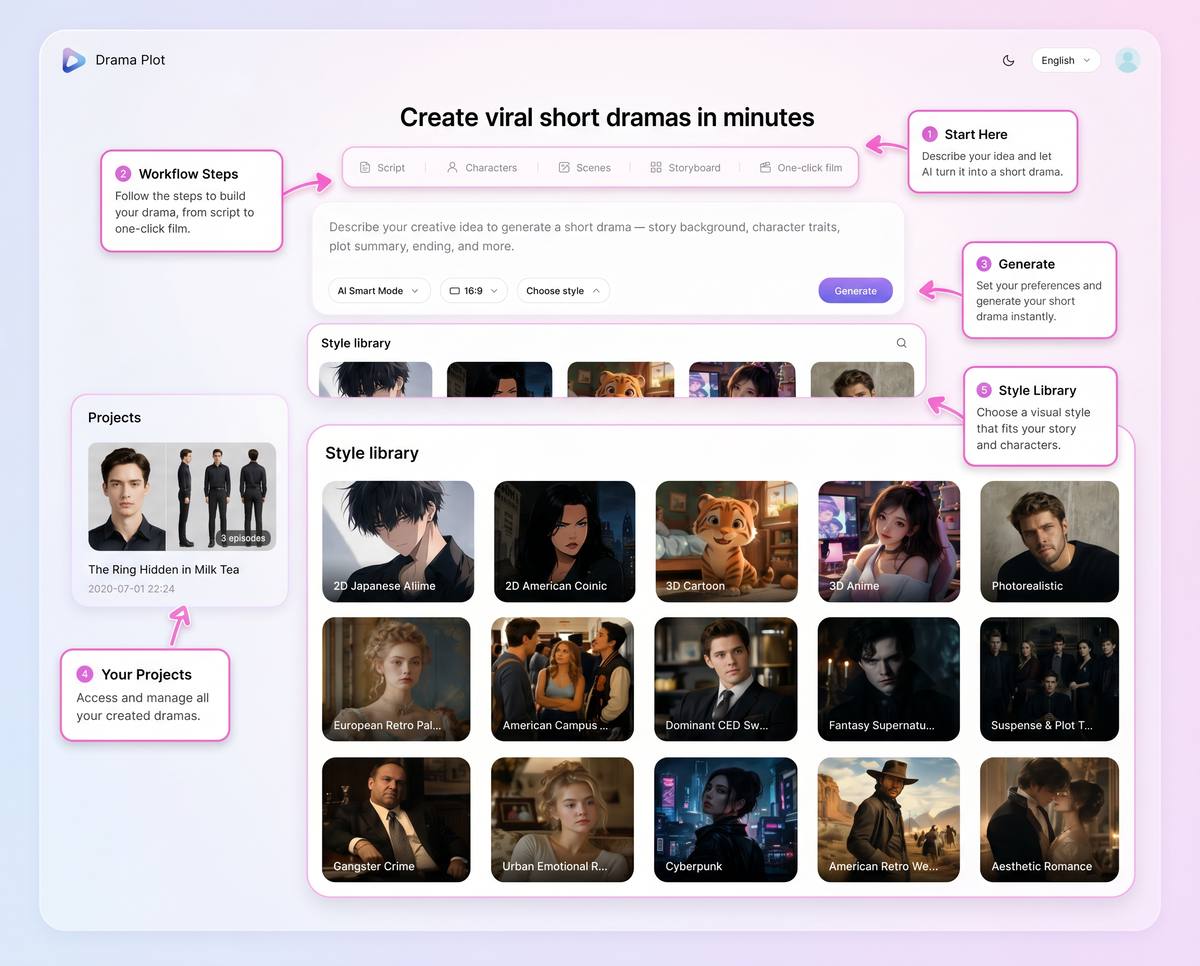
Begin by opening Drama Pilot and creating a new project.
Before generating the story, choose the basic production direction:
- Visual style
- Aspect ratio
- Project concept
- Short drama format
For vertical micro-dramas, a portrait aspect ratio may fit the intended platform. For cinematic or widescreen storytelling, a landscape format may be more appropriate.
The project becomes the central workspace for the script, characters, scenes, storyboards, generated clips, and episodes.
Step 2: Describe Your Story Idea
Enter a clear story premise in natural language.
The idea does not need to be a finished screenplay. It can begin with one sentence:
A betrayed heiress returns under a new identity and joins the company that destroyed her family.
A useful starting idea should establish:
- The main character
- The central conflict
- The emotional direction
- The story world
- The type of dramatic hook
Avoid placing every plot detail into the first instruction. Start with the core premise, then develop the story through the generated script structure.
Step 3: Review the Episodic Script
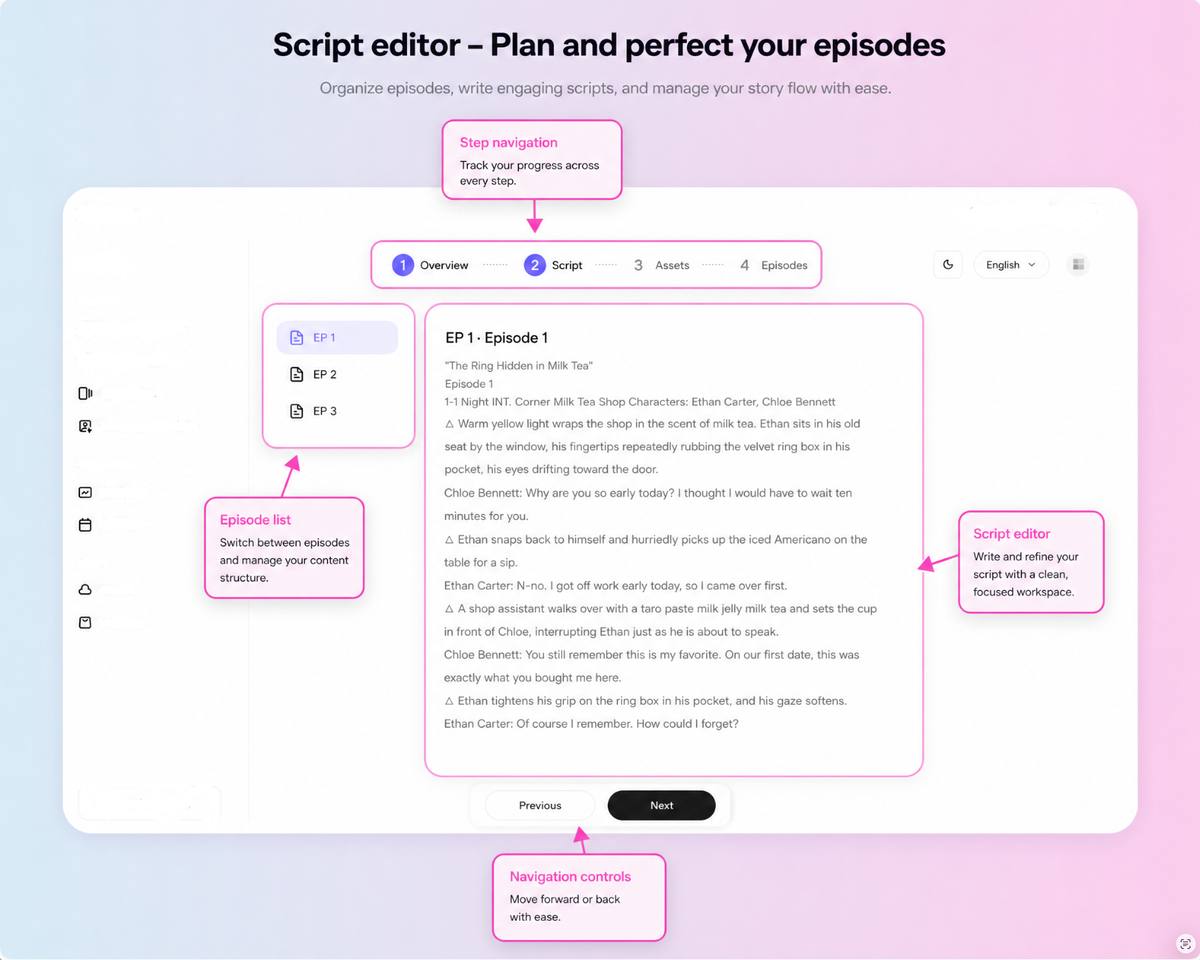
Drama Pilot can expand the idea into a structured short drama project containing a synopsis, story background, character information, episode outlines, dialogue, and narration.
Review the script before generating large batches of visual assets.
Check:
- Does the first episode open with a strong hook?
- Does each episode contain a clear change or reveal?
- Are the character motivations understandable?
- Is the dialogue concise enough for short-form storytelling?
- Does the episode end with a reason to continue watching?
Edit weak scenes before moving into visual production. Fixing a story problem at the script stage is easier than rebuilding multiple generated shots later.
For a broader planning workflow, read Turning One Idea into a Complete AI Short Drama.
Step 4: Generate Characters and Scenes
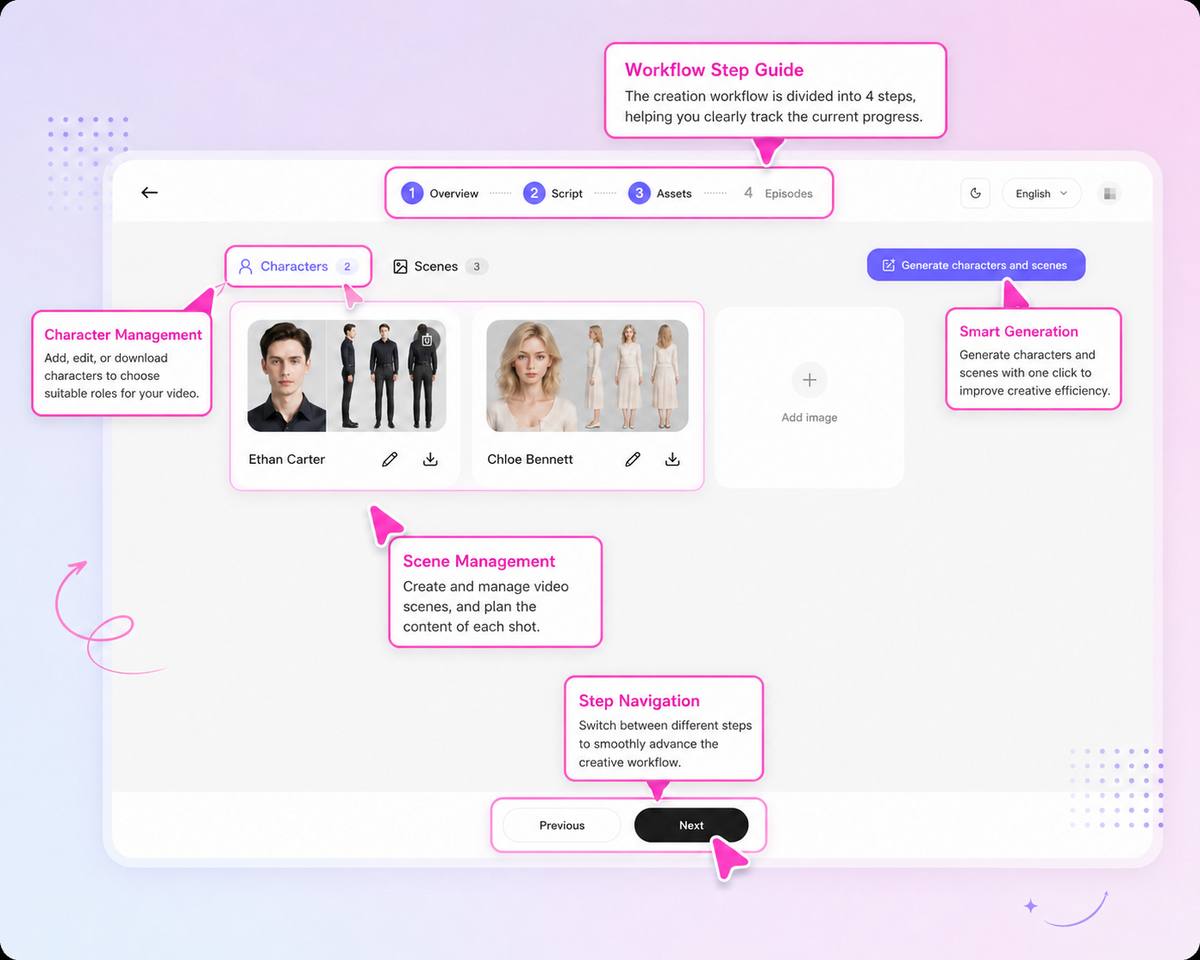
Once the script direction is approved, create the recurring visual assets.
Drama Pilot can generate multi-view character sheets to establish facial features, hairstyle, body type, wardrobe, and overall styling. It can also create panoramic scene assets for recurring locations.
Review each important character for:
- Face and age
- Hair and body proportions
- Default wardrobe
- Accessories
- Visual style
Review each recurring scene for:
- Layout
- Doors and windows
- Major furniture
- Important props
- Lighting direction
- Time of day
Create approved variations when the story requires a costume change, flashback appearance, or day-and-night version of a location.
For detailed continuity guidance, read How to Keep AI Characters and Scenes Consistent Across Shots.
Step 5: Generate and Direct the Storyboards
Drama Pilot breaks the script into episodes and individual shots, maps the relevant characters, and creates base storyboards.
Review every shot according to its story purpose.
You can work with:
- Wide, medium, and close-up framing
- Shot-reverse-shot dialogue coverage
- Push, pull, pan, track, and orbit movements
- Lighting direction and color temperature
- Keyframe controls
Do not make every shot complex. A static close-up may communicate an emotional realization more clearly than an elaborate orbit.
Each storyboard should answer three questions:
- What new information does the audience receive?
- Which character owns the emotional beat?
- How does the shot connect to the next one?
For more detail, read AI Camera Shots and Movements for Short Drama Scenes.
Step 6: Generate and Review Video Clips
After the storyboards are ready, generate the planned shots.
Review clips for:
- Character identity
- Wardrobe
- Scene layout
- Action
- Camera direction
- Lighting
- Start and end frames
- Connection to surrounding shots
Do not judge a clip only by how impressive it looks on its own. A usable shot must fit the sequence.
When a shot fails, diagnose the primary problem before regenerating it. Change one variable at a time rather than rewriting the entire instruction.
For example:
- Strengthen the character reference when the face changes
- Simplify the action when motion breaks
- Remove competing camera directions
- Reinforce scene landmarks when the location drifts
- Define the final composition when the shot ends incorrectly
Use the repair process in How to Fix Failed AI Video Generations.
Step 7: Assemble and Export the Episode
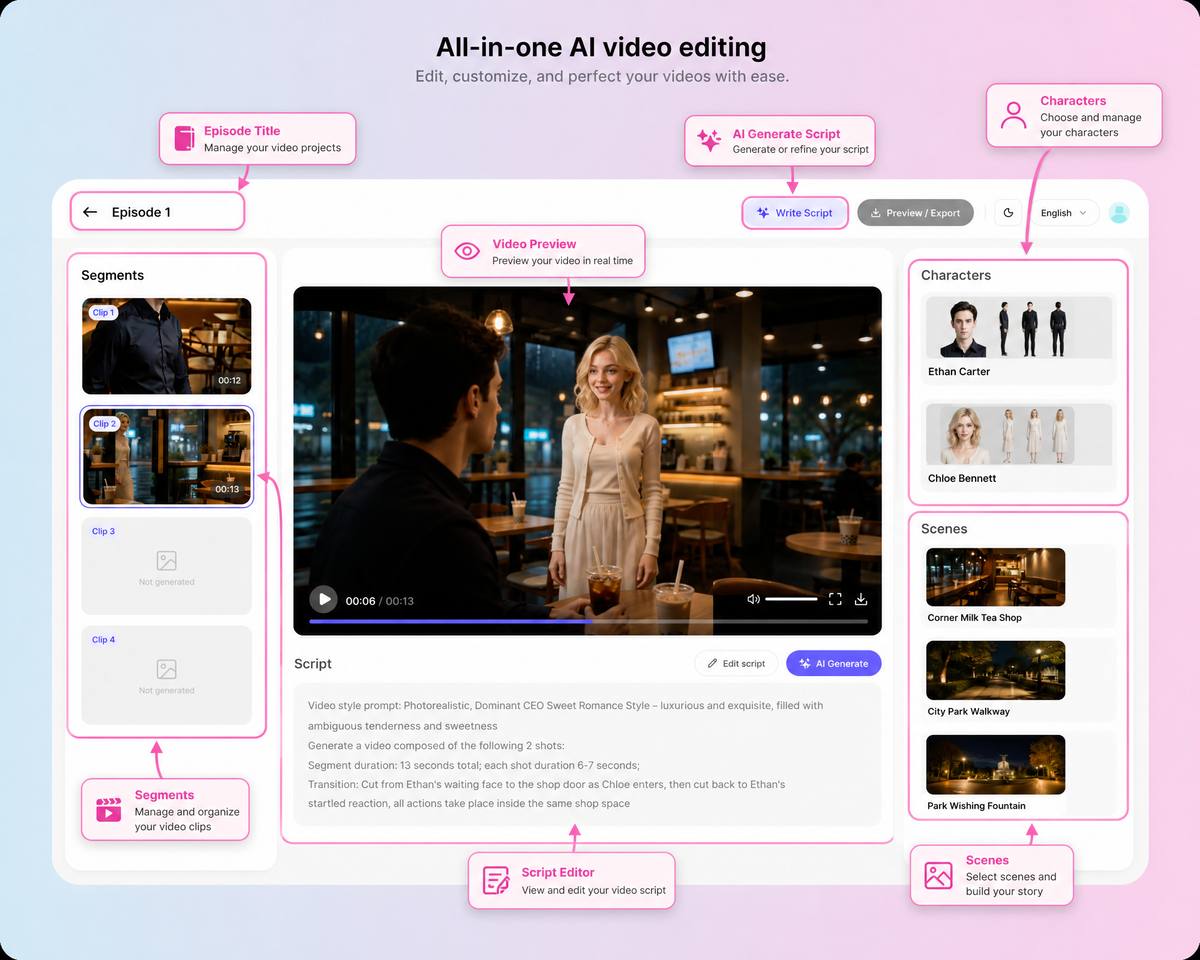
Once the strongest clips are approved, organize them in story order and assemble the episode.
Drama Pilot supports batch rendering, clip sequencing, episode stitching, and export within the same production workflow.
During the final review, check:
- Opening hook
- Dialogue and reaction coverage
- Pacing
- Visual continuity
- Audio continuity
- Repeated information
- Final cliffhanger
Trim unstable frames before or after the useful action. Most shots should connect with direct cuts, while transitions should be used only when they communicate a change in time, place, memory, or story state.
For the complete assembly process, read How to Assemble AI-Generated Shots into a Complete Episode.
Tips for Better Results
A few production habits can improve the workflow:
- Approve characters and scenes before generating many shots
- Give each shot one primary action or emotional change
- Use one dominant camera movement per shot
- Review clips beside the previous and next shots
- Keep alternate takes for important reactions
- Fix the script or shot plan when a prompt becomes too complicated
- Regenerate only the shots that need correction
The objective is not to make every generation perfect. The objective is to build a coherent episode efficiently.
Who Is This Workflow For?
This workflow is designed for:
- Independent AI filmmakers
- Short drama and micro-drama creators
- Writers turning stories into visual episodes
- Small production teams
- Studios producing serialized content
- Creators working on vertical narrative video
Drama Pilot is not a general-purpose video editor or a standalone video generation model. It is a connected production platform for building serialized short dramas from script to episode.
Create Your First AI Short Drama
A complete short drama begins with a story decision, not a complicated production setup.
Start with one clear idea. Review the script, approve the recurring visual assets, direct the storyboards, generate focused clips, and assemble the strongest results into an episode.