General-Purpose AI Can Write a Scene. Can It Produce a Complete Short Drama?
General-purpose AI models are remarkably good at turning a simple idea into words.
Give one of them a premise such as:
A struggling waitress discovers that the quiet customer who visits her café every night is the heir to a billion-dollar company.
Within seconds, it can suggest character names, plot twists, episode outlines, dialogue, and even camera directions.
That can feel like an entire production process.
But writing a convincing scene and producing a complete AI short drama are not the same task.
To understand the difference, imagine creating the same short drama in two ways:
- Using a general-purpose AI model and several separate creative tools.
- Using a production platform designed specifically for episodic AI drama.
The destination may sound similar, but the workflows are very different.
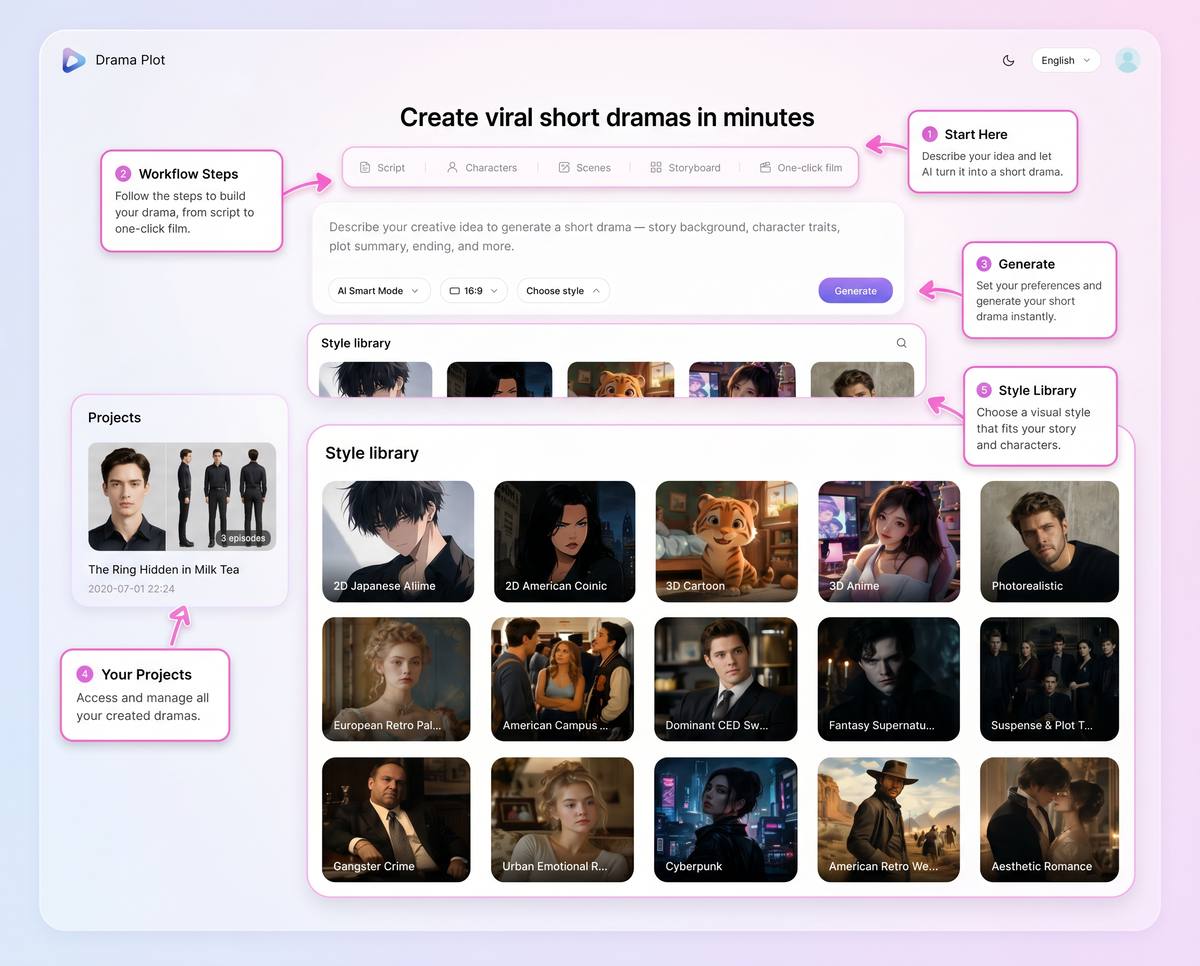
Drama Pilot organizes the journey from an initial idea to scripts, characters, scenes, storyboards, and generated video.
What General-Purpose AI Models Do Well
General-purpose AI models are designed to handle many different types of tasks.
They can answer questions, summarize documents, write code, develop marketing ideas, rewrite dialogue, and brainstorm fictional stories. Tools such as ChatGPT and Gemini are useful precisely because they are flexible.
For an AI short drama creator, this flexibility can be especially valuable during the early creative stage.
A general-purpose AI model can help you:
- Explore different story premises.
- Generate character backstories.
- Develop hooks and cliffhangers.
- Rewrite dialogue in different tones.
- Suggest alternative endings.
- Expand a short idea into an episode outline.
- Analyze whether a scene contains enough conflict.
For creators trying to overcome writer's block or explore an unfinished idea, a general-purpose model can be an excellent creative assistant.
The difficulty begins when the written content must become a repeatable visual production.
The Moment a Conversation Becomes a Production
Suppose a general AI model creates a promising story.
The protagonist is called Emma. She is 26 years old, has shoulder-length brown hair, wears a cream café uniform, and hides her financial problems from her younger brother.
The male lead is called Adrian. He initially appears in a dark coat, speaks very little, and visits the café every night.
The first scene works well. The dialogue feels natural, and the emotional hook is clear.
You then ask the model to write Episode 2.
Emma may suddenly become 24. Her hair may be described as black. Adrian may arrive in a business suit instead of the dark coat. A supporting character may be renamed, and the café layout may change without explanation.
None of these problems means the model is unintelligent.
The problem is that a chat response is not the same thing as a structured production system.
A general-purpose AI model usually gives you content inside a conversation. A drama production workflow needs to convert that content into persistent and connected production assets:
- A canonical character profile.
- Approved wardrobe references.
- Reusable location descriptions.
- Episode-level scripts.
- Shot-level visual instructions.
- Storyboard frames.
- Camera and lighting decisions.
- Generated video clips.
- A review and revision history.
Without that structure, the creator becomes responsible for manually managing every part of the production.
Workflow One: Creating a Drama with General AI
A typical general-AI workflow might look like this.
Step 1: Generate the concept
You ask the model to expand a one-sentence idea.
It returns a synopsis, character descriptions, possible plot twists, and several episode arcs.
Step 2: Ask for scripts
You prompt the model again to write the individual episodes.
During every new conversation, you may need to remind it about the desired episode length, tone, target audience, character relationships, visual style, and previous plot details.
Step 3: Extract character information manually
You copy each character description into a separate document.
You then rewrite those descriptions as image-generation prompts and create reference images using another tool.
Step 4: Create scene references
You identify every location in the script, write separate environment prompts, and generate visual references for the café, apartment, office, street, and other recurring locations.
Step 5: Break the script into shots
You return to the AI model and ask it to convert each scene into a shot list.
The output may include wide shots, close-ups, reaction shots, camera movements, lighting instructions, and estimated durations.
Step 6: Generate storyboards and video clips
You paste the individual shot prompts into one or more image or video generation tools.
Every result must be checked against the character reference, wardrobe, location, time of day, story context, and surrounding shots.
Step 7: Track every change manually
When one scene changes, you may need to update the script, character document, shot list, prompt document, storyboard, and generated video clips separately.
This approach can work.
It can even produce excellent results in the hands of an experienced creator.
However, it requires the creator to design, connect, and maintain the entire production pipeline.
Workflow Two: Creating the Same Drama with Drama Pilot
Drama Pilot is designed around the complete project rather than the individual prompt.
Instead of treating the synopsis, characters, scenes, shots, and videos as unrelated responses, it keeps them inside one connected AI short drama workflow.
The process still begins with an idea.
But that idea is then converted into several manageable production stages.
1. The Story Becomes an Episodic Structure
The initial premise can be developed into a story background, synopsis, episode outline, and dialogue script.
Creators can review the story as a structured project instead of searching through a long chat history or switching between multiple documents.
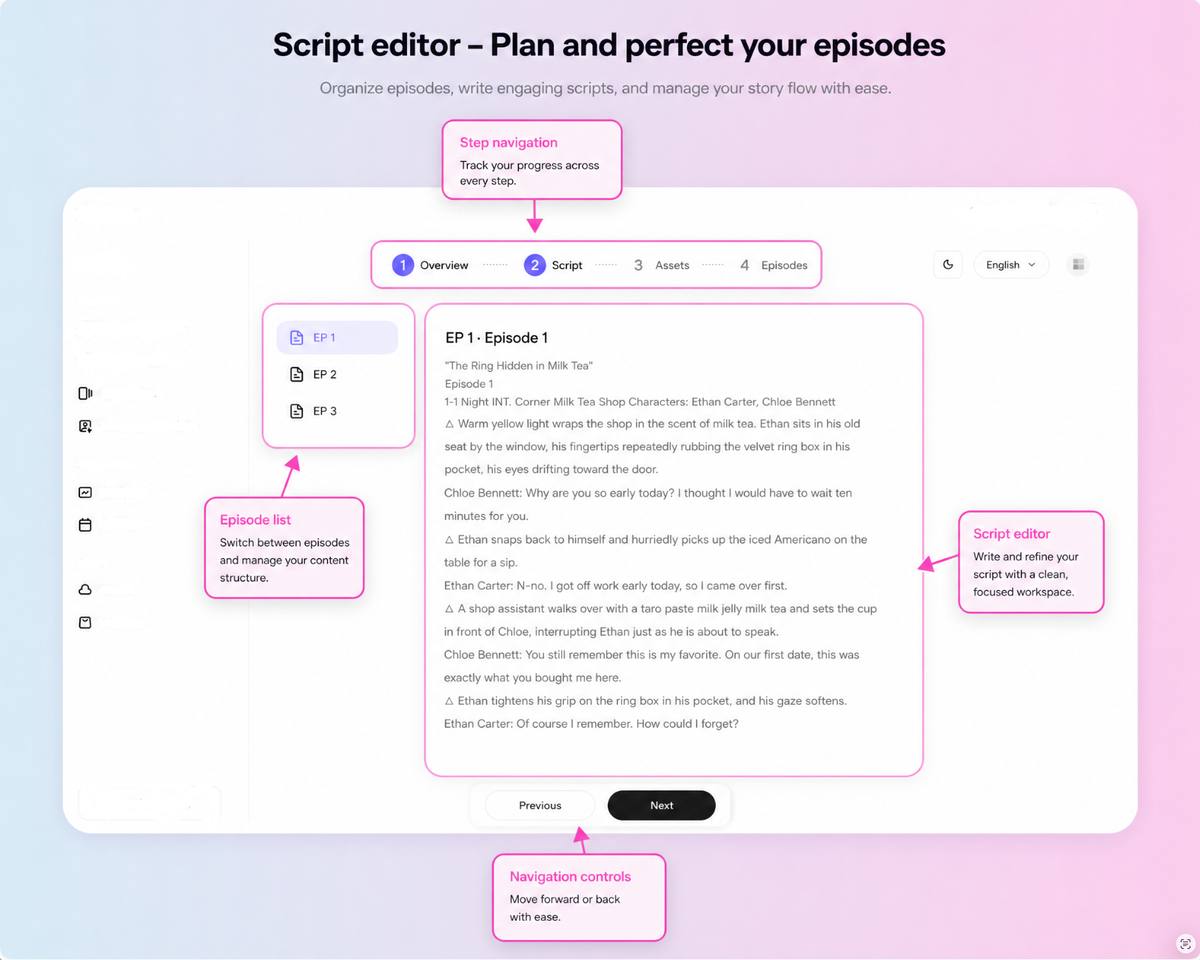
The script workspace keeps episodes, dialogue, narration, and story progression connected inside one project.
This matters because short drama is episodic by nature.
Every episode needs its own hook, escalation, emotional turn, reveal, and reason for the audience to keep watching.
A strong overall premise is not enough when the episode structure does not support retention.
2. Characters and Scenes Become Reusable Assets
Drama Pilot extracts important characters and locations from the story and turns them into manageable production assets.
Character references can define facial features, body type, hairstyle, clothing, visual identity, and appearance from different angles.
Scene assets can establish the visual identity of recurring locations, including their layout, atmosphere, lighting, and key objects.
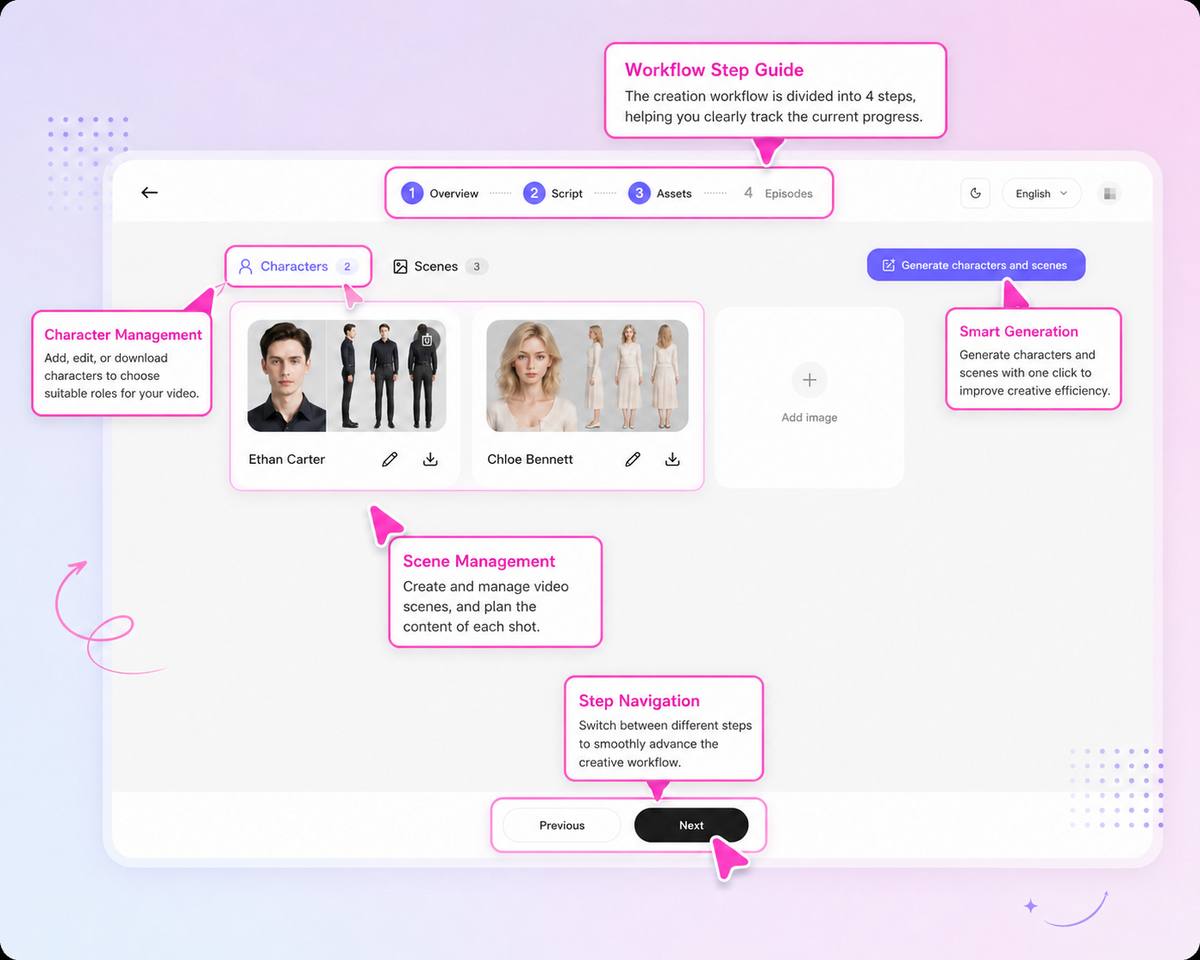
Characters and locations are managed as persistent project assets instead of being recreated from scratch for every prompt.
This does not mean that every generated frame will automatically be perfect.
AI video production still requires review, selection, and iteration.
The advantage is that creators have a stable reference system from which they can generate, compare, and evaluate every new shot.
3. Scripts Are Translated into Visual Shots
A screenplay explains what happens.
A production workflow must also determine how the audience will see it.
That requires decisions such as:
- Should the opening use a wide establishing shot or an immediate close-up?
- Should the camera remain still or slowly push toward the character?
- Which reaction should appear before the main reveal?
- Should the lighting feel warm, neutral, mysterious, or threatening?
- How long should each shot remain on screen?
- Which character, costume, prop, or background detail must remain consistent?
- What should happen in the first frame and the final frame?
Drama Pilot breaks episodes into storyboard shots and gives creators control over shot size, camera movement, lighting, visual composition, and keyframes.
The creator can therefore work at both the story level and the individual-shot level.
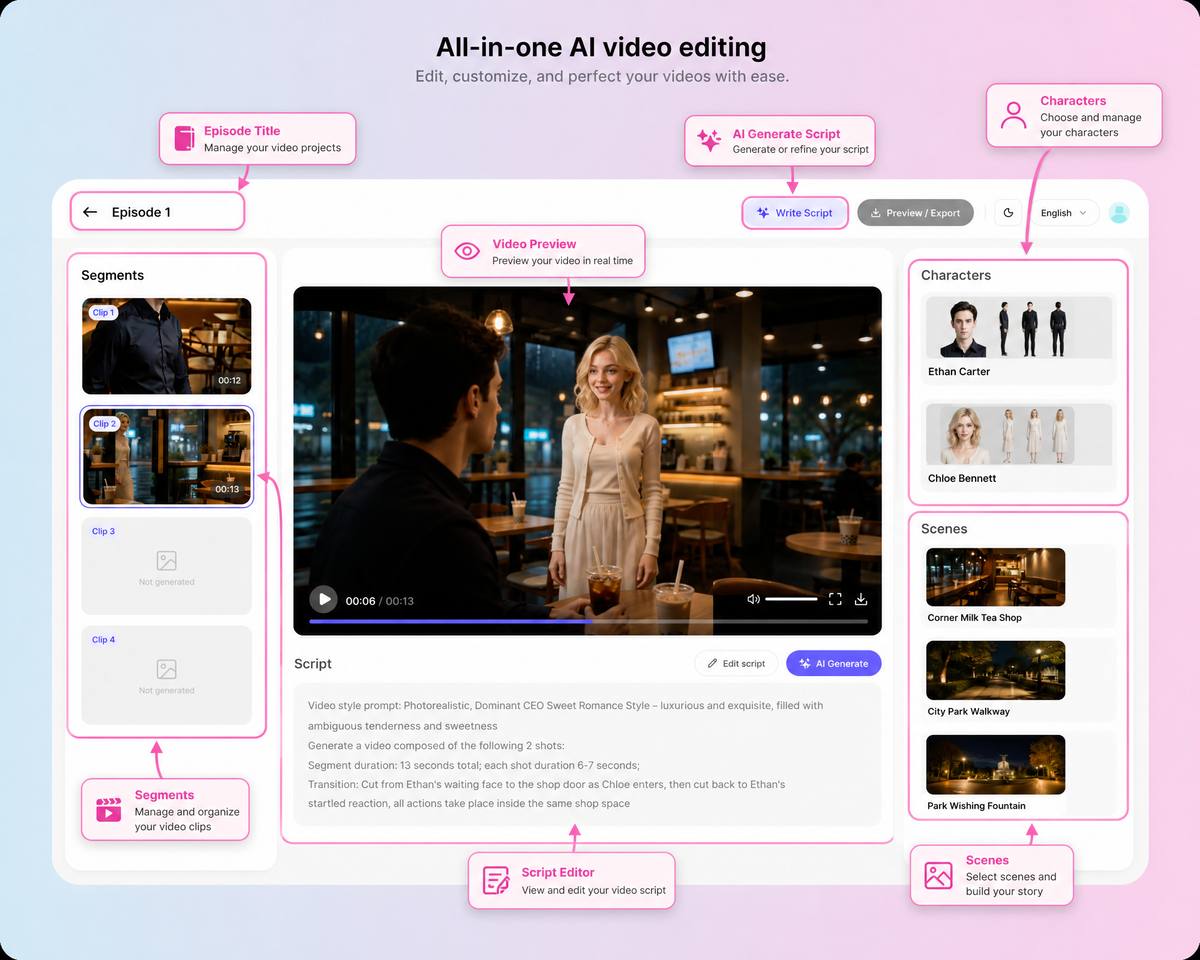
The production workspace connects scripts, storyboard shots, visual references, and generated clips.
4. Generated Clips Stay Connected to the Project
In a fragmented workflow, a generated video may end up in a downloads folder with a filename such as:
video-final-v7-revised-2.mp4
A week later, its relationship to the original script, character reference, scene description, and storyboard may no longer be clear.
When video generation remains connected to the episode workflow, creators can see which script section and storyboard shot a clip belongs to.
This becomes especially important when one shot needs to be regenerated without losing the context of the entire episode.
Instead of rebuilding the prompt from memory, the creator can return to the relevant scene, character, and shot information.
General AI vs Drama Pilot: A Practical Comparison
| Production task | General-purpose AI model | Drama Pilot |
|---|---|---|
| Brainstorming story ideas | Excellent | Integrated into the project workflow |
| Writing dialogue | Strong and flexible | Connected to episodes and production stages |
| Maintaining character records | Usually managed manually | Characters are stored as reusable project assets |
| Managing recurring locations | Usually managed manually | Scenes can be stored and reused |
| Dividing scripts into shots | Requires additional prompting | Included in the storyboard workflow |
| Camera and lighting planning | Usually provided as text suggestions | Organized at the individual-shot level |
| Connecting scripts to video clips | Requires external folders and tracking | Managed within the same production project |
| Revising an episode | Several prompts and files may need updating | Changes remain connected to the project |
| Producing multiple episodes | Requires a custom workflow | Designed for episodic drama production |
| Best use case | Flexible ideation and writing assistance | End-to-end AI short drama creation |
The comparison is not simply about which system is more intelligent.
It is about whether the tool is designed for the specific work being performed.
A general-purpose AI model is like a highly capable creative collaborator.
Drama Pilot is closer to a production workspace that coordinates the story, characters, scenes, shots, assets, and final deliverables.
Why More Prompts Do Not Always Create More Control
When an AI production starts losing consistency, the natural response is often to write a longer prompt.
The creator adds the protagonist's exact age, hairstyle, clothing, personality, location, lighting, emotional state, camera angle, lens, movement, background, and continuity requirements.
The prompt becomes extremely detailed.
But longer prompts can create new problems.
Important instructions may compete with one another. Some details may be interpreted differently between generations. Every revision requires editing several sections of text.
A detail changed in Episode 3 may still appear inside an older prompt reused for Episode 4.
More text is not always the same as more control.
Structured information is often more useful than repeated information.
A dedicated production workflow separates the project into manageable layers:
- Story concept.
- Episode structure.
- Scripts and dialogue.
- Character assets.
- Scene assets.
- Storyboards.
- Shot instructions.
- Generated clips.
- Review and export.
Each layer can be edited without rewriting one enormous production prompt.
For a deeper explanation of this issue, read Why AI Short Drama Creation Needs a Workflow, Not Just a Prompt.
When Should You Use a General-Purpose AI Model?
A general-purpose AI model remains a powerful part of the creative process.
It may be the better starting point when:
- You are exploring many unrelated ideas.
- You only need a logline or a short script.
- You want help researching a genre.
- You need several rapid dialogue variations.
- You want feedback on a story concept.
- You are not yet ready to generate visual assets.
- You already have a custom production pipeline.
Many creators will continue to use general-purpose AI alongside specialized production tools.
The two categories are not mutually exclusive.
For example, a creator might use a general-purpose model to explore several endings, improve a character's motivation, or rewrite a specific conversation.
Once the story direction is approved, the creator can move into Drama Pilot to manage the structured production workflow.
When Does a Dedicated Short-Drama Workflow Become Valuable?
A specialized workflow becomes increasingly valuable when:
- The story contains multiple episodes.
- Characters return across many scenes.
- Wardrobe and locations must remain recognizable.
- Several clips need to feel like parts of the same story.
- Individual shots need to be reviewed and regenerated.
- The creator is producing content repeatedly.
- Multiple team members need to review the same project.
- The production needs to move from experimentation to a repeatable process.
The difference becomes more visible as the project grows.
For one scene, manual coordination may feel manageable.
For ten episodes, recurring locations, multiple characters, hundreds of shots, and several rounds of revision, the coordination work can become larger than the creative work itself.
The Real Advantage Is Not One Better Prompt
The most important advantage of a dedicated AI short-drama platform is not that it produces one magical prompt.
The advantage is that the platform remembers what the production is supposed to be.
The story has a structure.
Characters have defined identities.
Scenes have visual descriptions.
Episodes have scripts.
Scripts become shots.
Shots become video clips.
Video clips become an episode.
That connected chain is what turns AI generation into AI production.
General-purpose AI models can help create many of the individual pieces.
Drama Pilot is designed to keep those pieces connected throughout the production process.
From AI Assistant to AI Production System
AI filmmaking is moving beyond the question:
Can AI generate a convincing video clip?
The more useful question is:
Can creators reliably turn one idea into a complete, consistent, and editable story?
A visually impressive clip is valuable.
A repeatable system for producing an entire short-drama series represents a different level of capability.
General-purpose AI gives creators an intelligent blank page.
Drama Pilot provides a production path from the first idea to scripts, characters, scenes, storyboards, generated video clips, and complete episodes.
Explore the Drama Pilot features, review the available production plans, or start creating your first AI short drama with Drama Pilot.