
One prompt can generate an impressive AI video clip, but it cannot reliably manage the story, character identity, scene state, camera logic, and continuity required across an entire short drama. The more shots and episodes a project contains, the more production information must remain stable outside any individual prompt.
This does not mean prompts are unimportant. It means a prompt should direct one controlled shot instead of trying to remember and produce the entire series.
This guide explains where single-prompt AI video generation breaks down, why longer prompts do not always solve the problem, and how to separate persistent production information from shot-level instructions.
What One AI Video Prompt Can Do Well
A focused prompt can be effective when the goal is one self-contained visual moment.
For example:
Medium close-up of a woman standing under a hotel entrance at night. She notices someone across the street and stops walking. One slow push-in as confusion becomes restrained anger. Cool rain reflections, warm lobby light behind her, realistic romantic drama style.
This prompt defines:
- The subject
- The location
- The main action
- The emotional change
- The framing
- The camera movement
- The lighting
- The visual style
It gives the model one clear target.
Single prompts work especially well for:
- Isolated reaction shots
- Establishing shots
- Simple character actions
- Mood tests
- Visual concepts
- Short advertisements
- Social media clips without recurring continuity
The difficulty begins when the next shot must contain the same character, outfit, location, emotional state, screen direction, and story information.
Why a Complete AI Short Drama Is Different
A short drama is not one generated clip. It is a sequence of dependent moments.
The second shot must inherit information from the first. Episode 2 must preserve decisions made in Episode 1. A recurring location must remain recognizable. A character cannot forget what they just discovered. The camera must show enough coverage for the clips to work together in the edit.
A complete short drama may require:
- A story premise
- Episode outlines
- Scene-level scripts
- Recurring character references
- Wardrobe versions
- Reusable location references
- Storyboards
- Shot lists
- Individual video prompts
- Generated takes
- Continuity review
- Episode assembly
No individual shot prompt should be responsible for storing all of this information.
The prompt is an instruction for the current generation. It is not a complete production memory.
Where a Single Prompt Breaks Down
1. Story Continuity
A prompt can describe what happens now, but it may not preserve why the moment matters.
Consider this instruction:
A woman angrily confronts a man in a hotel lobby.
The model may produce a dramatic confrontation, but it does not know:
- What the woman believes happened
- What the man is hiding
- Whether this is their first confrontation
- Which object or line reveals the truth
- How the scene should change their relationship
- What the following shot needs to show
Without this context, a visually successful clip may not advance the story.
2. Character Identity
Text descriptions are interpreted again during each generation.
Repeating “27-year-old woman with shoulder-length dark hair” does not guarantee the same facial structure, body proportions, hairstyle, or performance across multiple shots.
The problem becomes more visible when:
- The camera angle changes
- The character turns away and back
- Lighting changes
- Multiple characters enter the frame
- The scene moves to another location
- The outfit description is shortened or reordered
A reusable visual reference provides a more stable identity target than recreating the character from text for every clip.
For a detailed continuity process, read How to Keep AI Characters and Scenes Consistent Across Shots.
3. Wardrobe and Story State
A character may have several intentional versions:
- Work outfit
- Evening outfit
- Disguise
- Flashback appearance
- Injured appearance
- Clothing damaged during an action sequence
A prompt that only names the character does not automatically know which version belongs to the current point in the story.
The same problem affects props and emotional state.
If a character picks up a letter in Shot 3, the next shot must know which hand holds it. If the character has just learned about a betrayal, the performance should not return to a neutral expression. These are continuity states, not general character traits.
4. Scene and Spatial Continuity
A location is more than a mood description.
“Luxury hotel lobby at night” leaves many details open to reinterpretation:
- Where is the entrance?
- Where is the reception desk?
- Which direction does the elevator face?
- Where are the two characters standing?
- Which side of the frame should each person occupy?
- Where does the warm light come from?
If those details change between shots, the scene may feel like several unrelated hotels.
Recurring locations need stable landmarks, layout, lighting direction, and important props. Individual prompts should then describe only the current composition and action.
5. Camera and Action Conflicts
Long prompts often contain several competing instructions.
For example:
Emma enters the hotel, crosses the lobby, notices Adrian, opens a message on her phone, begins crying, turns toward the elevator, while the camera circles her, pushes closer, follows Adrian, and reveals another woman in the background.
This asks one clip to control:
- Several consecutive actions
- Two character performances
- A phone insert
- Multiple camera movements
- A background reveal
- A complex emotional transition
The result may complete some instructions and ignore others. Motion may collapse halfway through, the camera may choose the wrong subject, or the final frame may be impossible to connect to the next shot.
The solution is usually not a longer prompt. It is a simpler shot plan.
6. Editability
A generated clip may look attractive alone but still be unusable in sequence.
Editors need:
- A clear starting position
- A readable action
- A useful final frame
- Matching eyelines
- Compatible screen direction
- Reaction coverage
- Inserts for important information
- Enough stable duration to cut
A one-prompt generation does not automatically produce all the coverage required for a scene.
The production must decide which shots are needed before generation begins.
The Difference Between Production Memory and a Shot Prompt
The clearest way to avoid overloaded prompts is to separate information into layers.
| Layer | What it should contain | How often it changes |
|---|---|---|
| Series information | Premise, tone, protagonist, central conflict | Rarely |
| Character reference | Face, hair, body type, core wardrobe, identity | Only for planned versions |
| Scene reference | Layout, furniture, props, light direction | Only for intentional scene changes |
| Scene state | Current wardrobe, held objects, emotion, time of day | Between scenes or story beats |
| Shot instruction | Action, framing, camera movement, composition | Every shot |
| Continuity handoff | Final position and information needed by the next shot | Every transition |
This structure lets creators change one part without rewriting everything.
If the camera movement fails, revise the shot instruction. If the face changes, strengthen the character reference. If the room changes, correct the scene reference. If the emotional performance is wrong, check the current scene state.
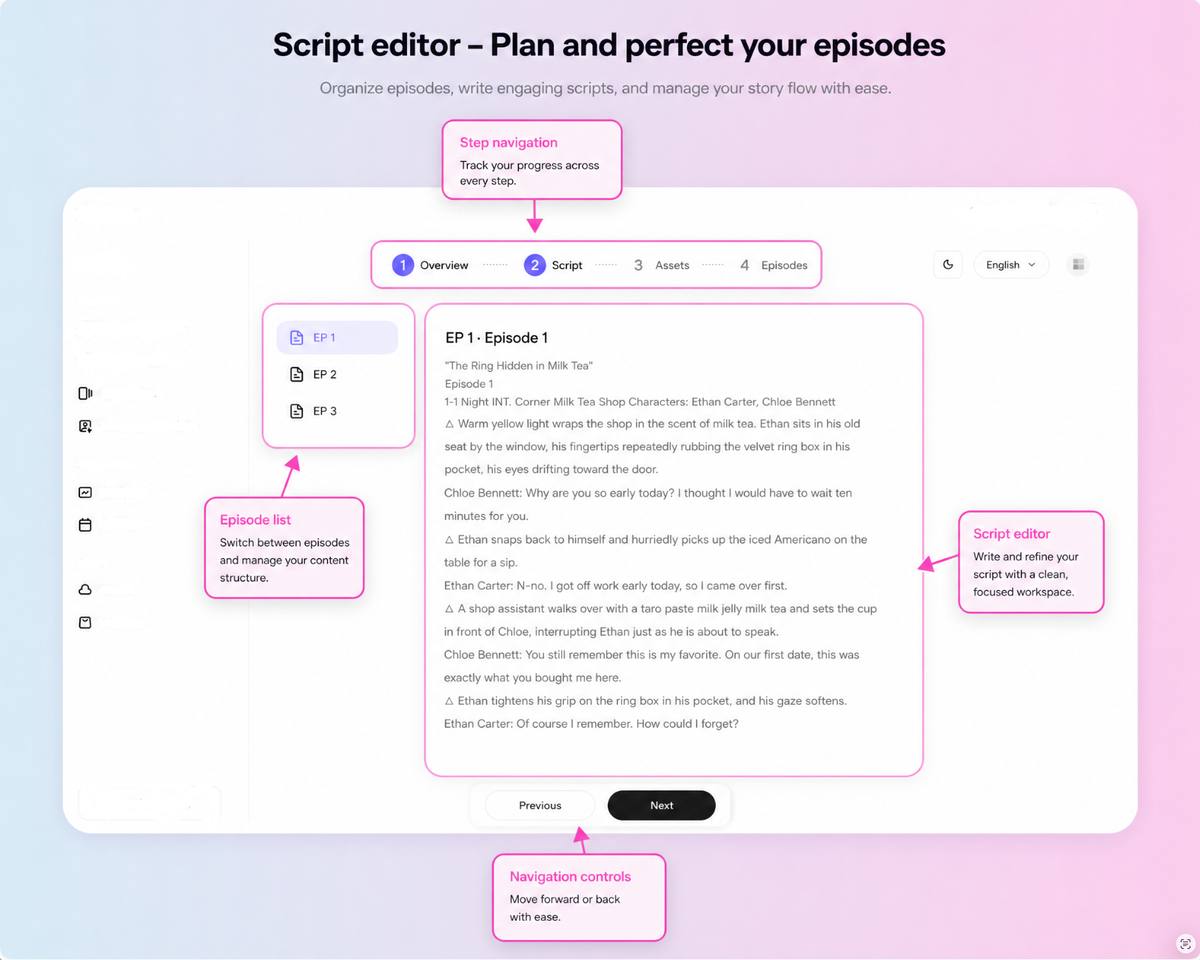
Separating persistent references from temporary shot instructions makes problems easier to diagnose and individual shots easier to replace.
A Better Alternative to One Overloaded Prompt
Imagine a scene in which Emma follows Adrian into a hotel and believes he is meeting another woman.
Instead of generating the whole scene with one prompt, divide it into purposeful shots.
Shot 1: Establish the Location
Purpose: Show the hotel entrance and establish that Emma is watching from outside.
Prompt focus: Wide shot, Emma in the foreground, Adrian entering the hotel in the distance, static camera, rain reflections.
Shot 2: Show Recognition
Purpose: Make it clear that Emma recognizes Adrian.
Prompt focus: Medium close-up, Emma stops walking, one slow push-in, expression changes from surprise to suspicion.
Shot 3: Reveal the Other Woman
Purpose: Introduce the information that creates the misunderstanding.
Prompt focus: Emma’s point of view through the glass doors, Adrian greets another woman, static composition.
Shot 4: Show the Evidence
Purpose: Explain why Emma believes the meeting is secret.
Prompt focus: Insert of Emma’s phone showing Adrian’s earlier message saying he would be working late.
Shot 5: Capture the Emotional Decision
Purpose: Move Emma from observation to action.
Prompt focus: Close-up, Emma locks the phone, controls her expression, and walks toward the entrance.
Each shot has:
- One story function
- One primary action
- One framing decision
- One camera behavior
- A clear relationship to the next shot
The full scene becomes easier to generate, review, repair, and edit.
Use AI Camera Shots and Movements for Short Drama Scenes to select coverage, then apply the prompt structure in How to Write Better AI Video Shot Prompts.
Why Longer Prompts Do Not Always Improve Consistency
When a generation fails, many creators add more description.
The prompt grows to include:
- The complete character biography
- Every facial detail
- Several wardrobe rules
- The entire room layout
- Story background
- Multiple actions
- Several emotions
- Lens language
- Camera movement
- Lighting
- Negative instructions
- Details required by the next shot
More information can help when the original instruction was vague. It can hurt when important directions compete for attention.
Common problems include:
- The main action becomes unclear.
- Camera directions contradict each other.
- Fixed character details compete with temporary scene details.
- Several emotional states are requested in too little time.
- The prompt describes actions that belong in separate shots.
- A detail copied from an earlier scene remains after the story state has changed.
A good shot prompt is not the longest possible description. It is the smallest complete instruction for the current visual beat.
One Prompt, One Shot, One Main Change
A practical rule for AI short drama generation is:
One prompt should direct one shot with one primary action or emotional change.
This does not mean every shot must be static or simple. It means the shot needs a clear priority.
A focused prompt can still include:
- Character and scene references
- Current wardrobe and props
- One action
- One emotional direction
- Shot size
- Subject position
- One camera behavior
- Lighting relevant to the shot
- Required start or end state
For example:
Use Emma’s approved character reference and beige trench-coat version. Medium close-up outside the hotel entrance, Emma on the left third of frame. She sees Adrian through the glass and stops walking. Her expression changes from recognition to restrained suspicion. One slow push-in. Cool rain light from the street, warm hotel light behind her. End with Emma looking screen right toward the entrance.
This prompt is detailed, but every detail supports one visual moment.
When Is One Prompt Enough?
One prompt may be enough when:
- The video contains one isolated shot.
- No character must remain consistent in later clips.
- The location will not reappear.
- The action is simple.
- The result does not need to connect to a longer edit.
- Visual experimentation matters more than continuity.
A structured workflow becomes more valuable when:
- A character appears in several shots.
- Two or more characters interact.
- Locations recur.
- Wardrobe and props carry story information.
- Dialogue scenes require coverage.
- Clips must connect into an episode.
- The project contains multiple episodes.
- Failed shots need to be replaced without rebuilding everything.
How Drama Pilot Separates the Project From the Prompt
Drama Pilot is designed around the production project rather than a single generation request.
Creators can develop and organize:
- Story ideas
- Episode outlines
- Scripts and dialogue
- Character profiles and visual references
- Recurring scene assets
- Storyboards
- Shot-level direction
- Generated clips
- Episode sequences
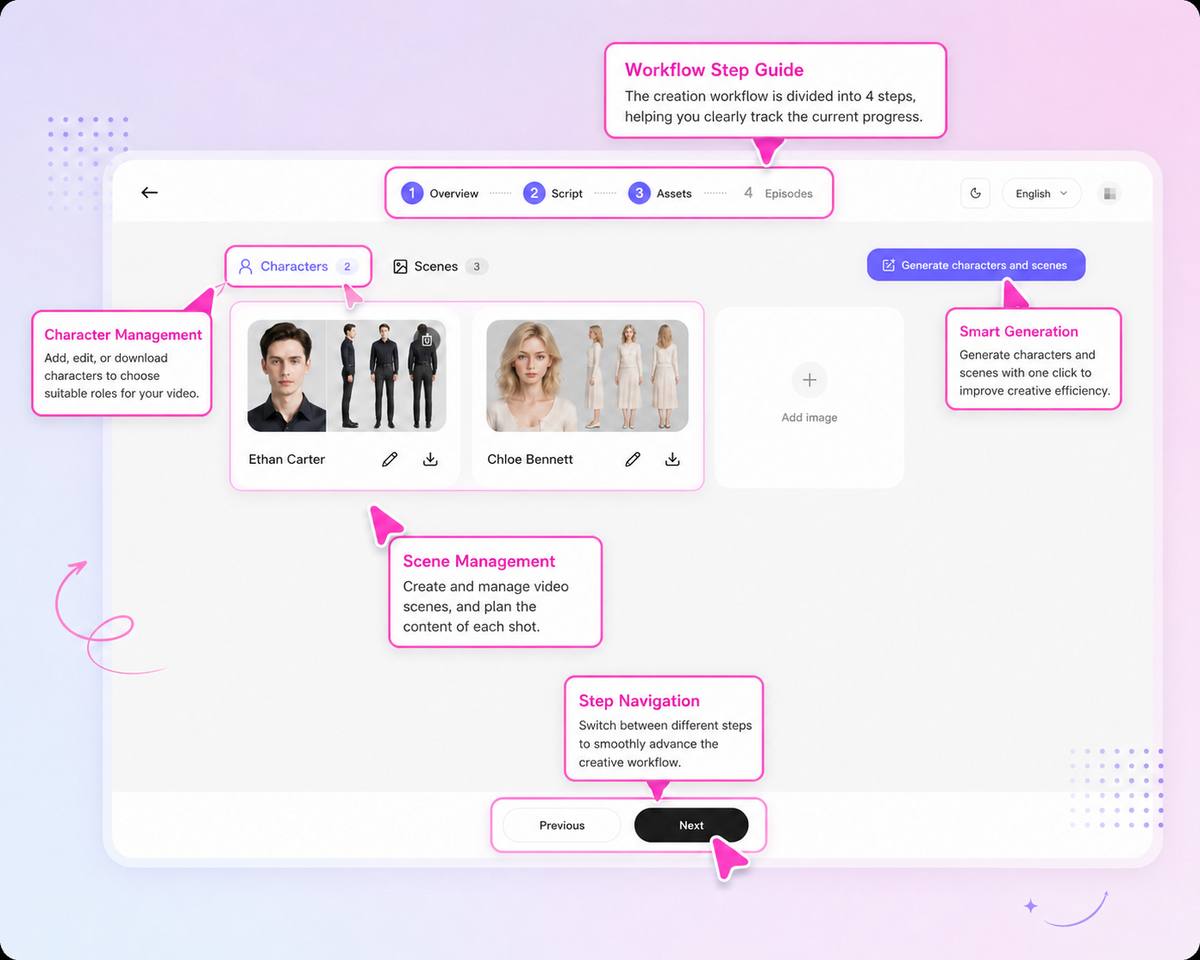
The storyboard stage keeps individual shot instructions connected to the episode, characters, locations, framing, movement, lighting, and keyframes. If one shot fails, it can be reviewed as a specific production problem instead of forcing the creator to reconstruct the whole scene from one long prompt.
For the complete process, read AI Short Drama Workflow: From Story Idea to Complete Episode.
Prompt-Limitation Checklist
Before sending a generation request, ask:
- Is this one shot or an entire scene disguised as one prompt?
- What is the single most important action?
- What emotional change must be visible?
- Which character and wardrobe reference applies?
- Which scene version applies?
- What must remain fixed?
- Is there only one primary camera behavior?
- Does the final frame need to connect to another shot?
- Am I adding context that belongs in the project instead of the prompt?
If the prompt contains several actions, locations, reveals, or camera movements, divide it into separate shots.
If the same descriptive block is being copied into every generation, move those details into reusable character and scene references.
Frequently Asked Questions
Can one prompt generate a complete AI short drama?
It may generate a concept or a short montage, but it cannot reliably control story structure, recurring characters, scene state, shot coverage, and continuity across a complete multi-shot or multi-episode drama.
Do longer prompts create more consistent AI videos?
Not always. More detail helps when an instruction is vague, but overloaded or conflicting directions can reduce control. Separate persistent references from the current shot action and camera instruction.
Why does the same character change between prompts?
Each text-only generation may reinterpret the character description. Use an approved visual reference, maintain the correct wardrobe version, simplify the shot, and review the result beside adjacent clips.
How many actions should an AI video prompt contain?
Use one primary physical action or emotional change per shot whenever possible. Complex scenes should be divided into several focused visual beats.
What information should stay outside the prompt?
Store the full story, episode structure, character identity, scene layout, wardrobe versions, and continuity history at the project level. The prompt should focus on the current shot.
Final Takeaway
A prompt is a production instruction, not a production system.
Use one prompt to direct one focused shot. Keep the story, character references, scene assets, wardrobe versions, and continuity state connected outside that prompt. Plan the coverage before generation, review clips in sequence, and revise the layer responsible for each failure.
The goal is not to write one enormous prompt. It is to give every shot the right information at the right time.