7 Essential Tools to Complete Your AI Short Drama Workflow with Drama Pilot
Slug: tools-for-ai-short-drama-workflow
Meta Description:
Discover seven complementary tools for building an AI short drama workflow with Drama Pilot, including character design, voices, editing, subtitles, thumbnails, and final delivery.
Creating a strong AI short drama takes more than a video generator.
A complete production may involve story development, episode scripts, recurring characters, reusable locations, storyboards, individual video shots, dialogue, sound design, editing, subtitles, thumbnails, and final distribution.
The challenge is not finding one tool that claims to do everything.
The challenge is building a workflow in which every tool has a clear role.
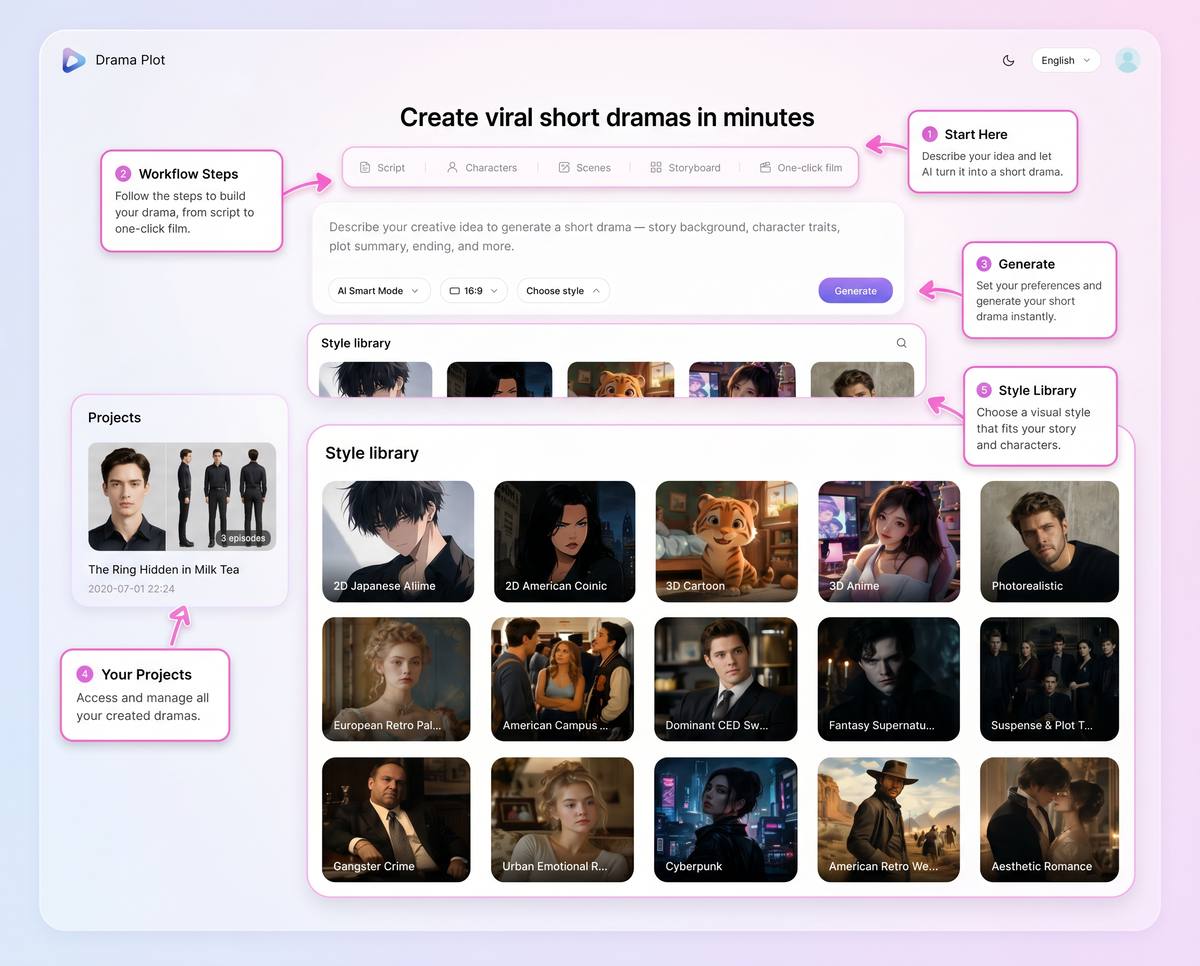
Drama Pilot can serve as the central production workspace for the story, scripts, characters, scenes, storyboards, shots, and episode structure. Supporting tools can then help with specialized tasks such as visual development, character voices, image cleanup, professional editing, captions, and promotional design.
This guide covers seven tools that can complement Drama Pilot without replacing the core short drama production workflow.
Disclosure: This article is published by Drama Pilot. Product features and pricing were reviewed using publicly available official information in July 2026. Prices may vary by country, platform, billing cycle, taxes, and promotions.
Start creating with Drama Pilot
What to Look for When Building an AI Short Drama Tool Stack
Before adding another tool to your production process, ask what specific problem it solves.
A useful short drama tool stack should cover several distinct stages.
A Central Production Workspace
The central platform should keep the creative project organized from beginning to end.
That may include:
- Story ideas
- Story backgrounds
- Episode outlines
- Dialogue and narration
- Character profiles
- Scene assets
- Storyboards
- Shot plans
- Generated clips
- Episode assembly
Without a central workspace, creators may end up managing important story information across unrelated documents, image folders, prompt histories, and editing timelines.
Consistent Visual Development
Recurring characters and locations should remain recognizable.
Visual-development tools can help establish:
- Facial appearance
- Hairstyles
- Clothing
- Props
- Environment design
- Color palettes
- Poster concepts
- Storyboard references
These assets should support the production plan rather than become disconnected experiments.
Character Voices and Sound
A short drama also needs an audio identity.
Creators may need:
- Character dialogue
- Narration
- Voice cloning
- Sound effects
- Music
- Dubbing
- Multiple language versions
Voice and sound tools are most useful when the audio remains connected to the script and individual scenes.
Editing and Delivery
Generated clips still need to become finished episodes.
Post-production may include:
- Clip trimming
- Timeline editing
- Color correction
- Audio mixing
- Subtitles
- Transitions
- Vertical formatting
- Final export
- Social-media delivery
Promotional Assets
The production process does not end when the episode is exported.
Creators also need:
- Series posters
- Episode covers
- YouTube thumbnails
- TikTok and Reels graphics
- Character cards
- Promotional banners
The best tool stack supports both production and release.
1. Drama Pilot
Best for: Managing the complete AI short drama production workflow
Drama Pilot is the central platform in this workflow.
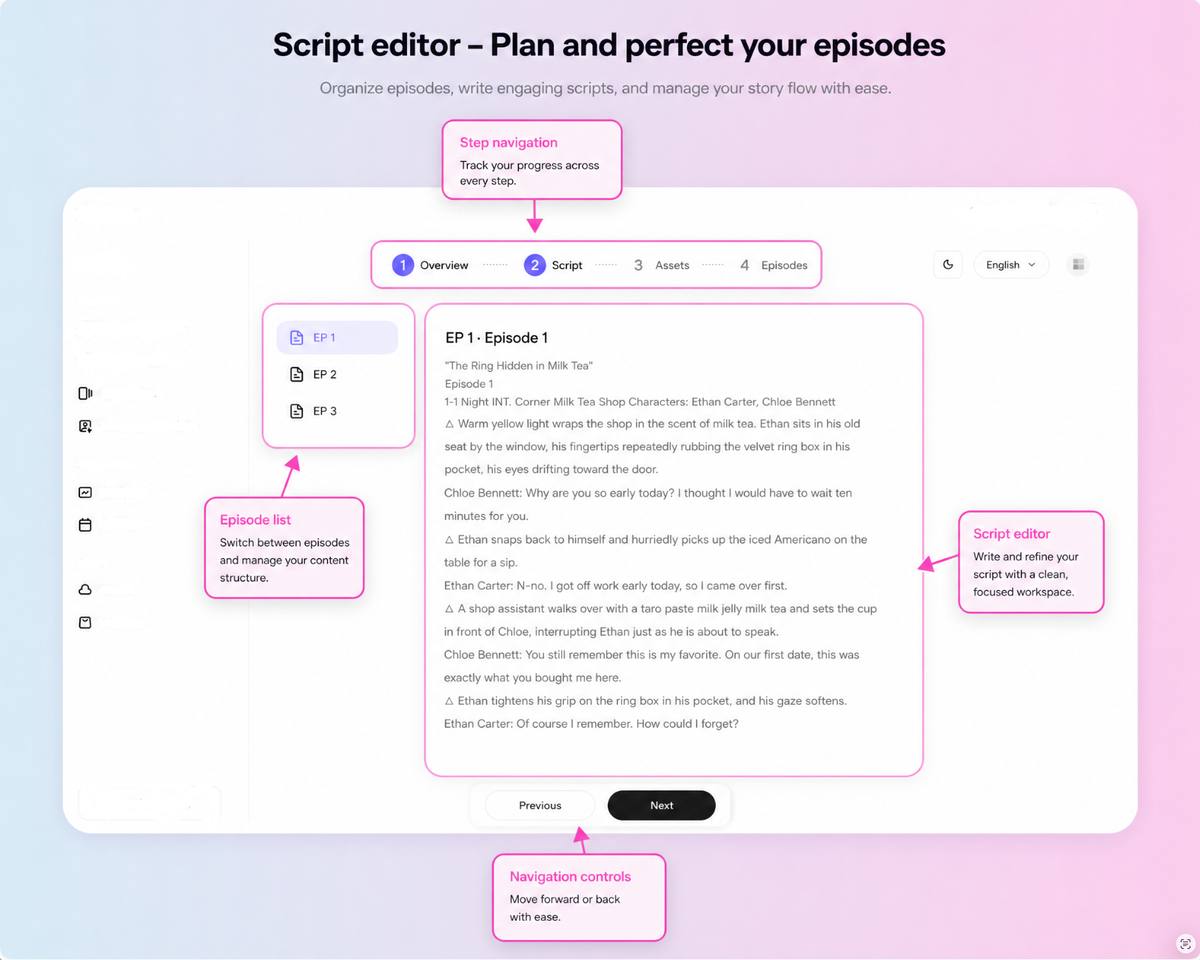
It is designed for story-driven and episodic AI video production rather than isolated video clips. Creators can begin with a single idea and develop it into a story background, synopsis, episode structure, dialogue script, characters, scenes, storyboards, planned shots, generated clips, and assembled episodes.
Key Features
- AI story outline and episodic script generation
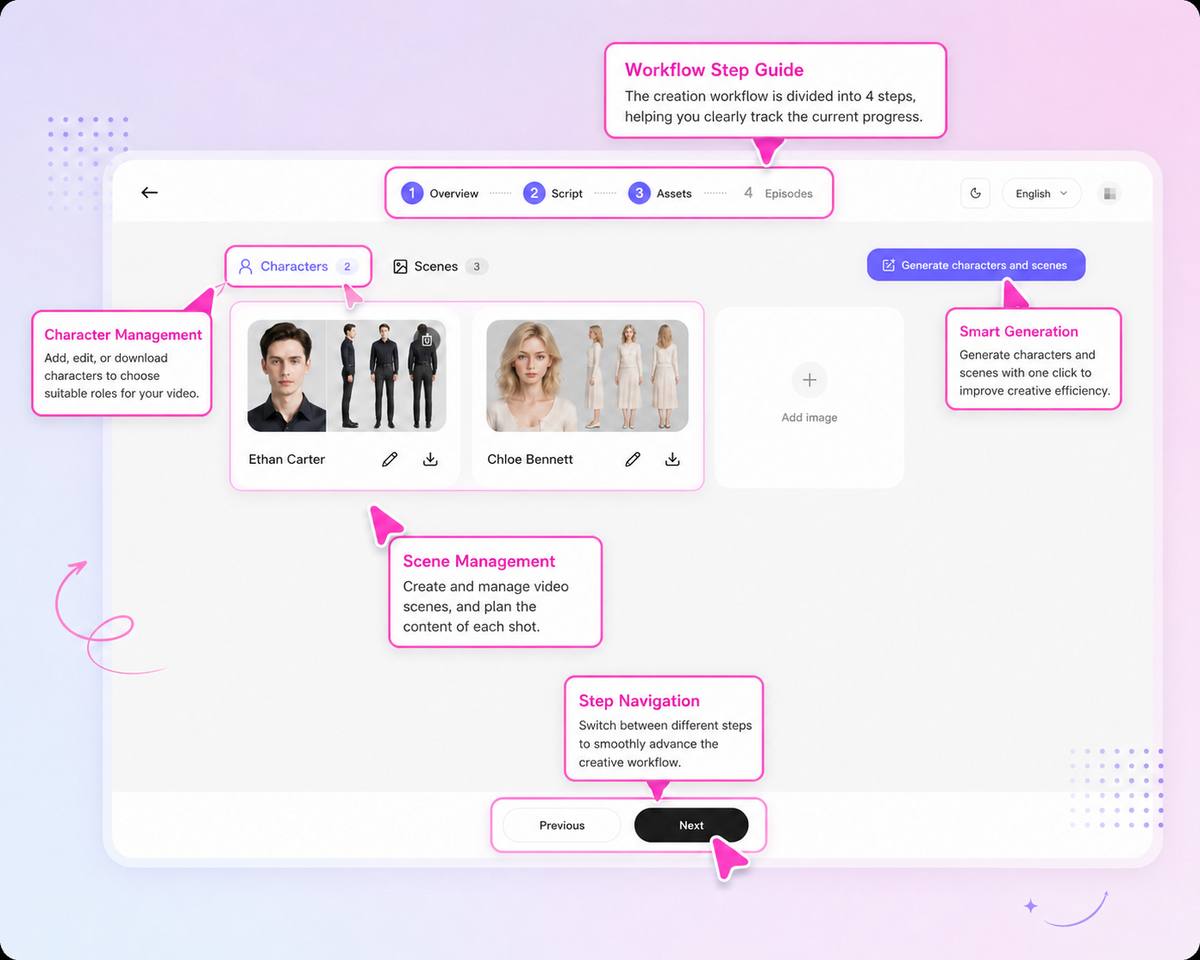
- Character, scene, and prop extraction
- Three-view character sheets
- Reusable character and scene assets
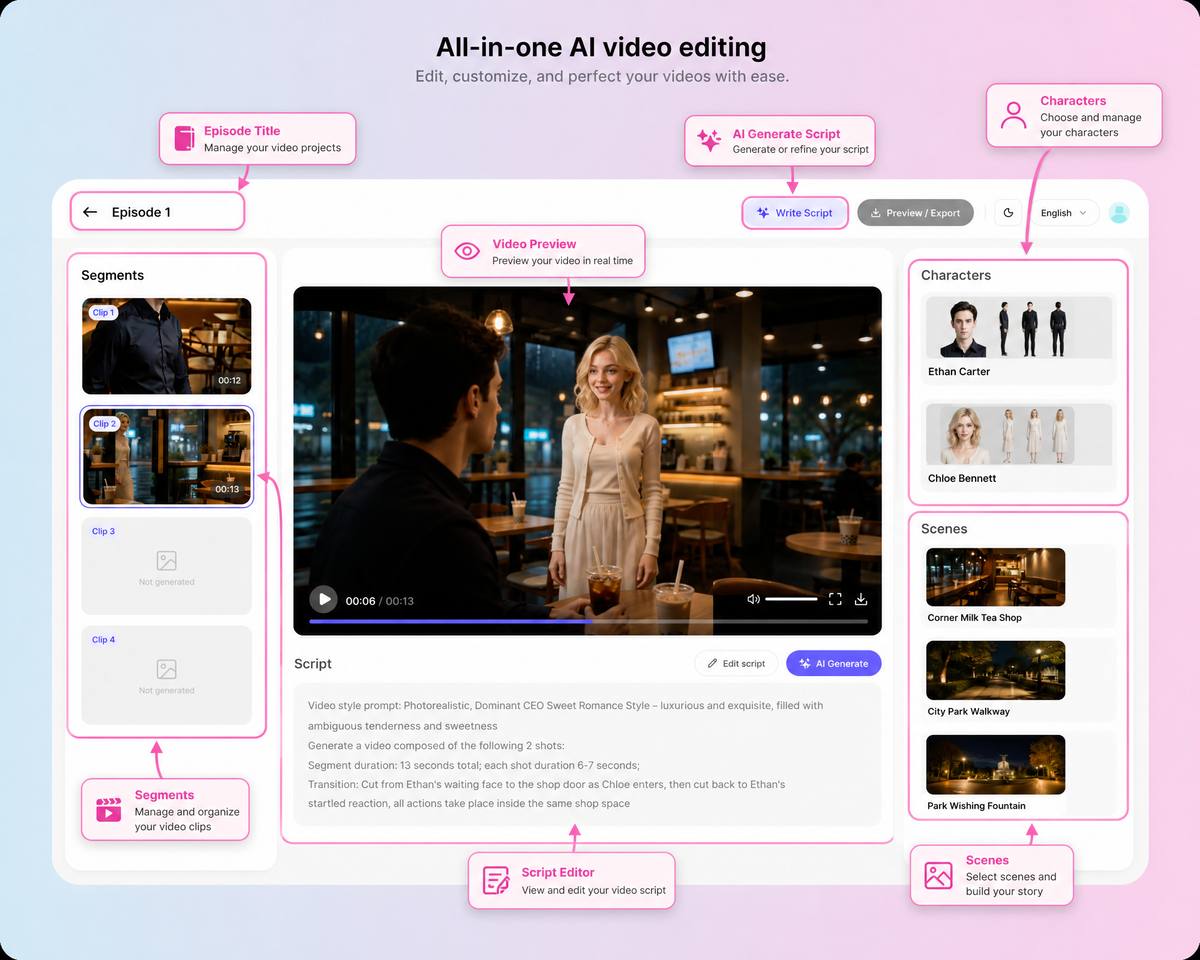
- Automatic storyboard parsing
- Shot-size and camera-movement controls
- Lighting and keyframe controls
- Batch clip generation
- Episode sequencing, merging, and export
- Project history and asset management
Why It Belongs at the Center of the Workflow
Most supporting tools specialize in one production task.
Drama Pilot keeps the full story connected.
Instead of separately managing a script document, character references, scene images, storyboard notes, prompts, generated clips, and episode files, creators can organize the major production stages inside one structured project.
This makes it easier to answer practical questions such as:
- Which character appears in this shot?
- Which location should be reused?
- What happens before and after this scene?
- Which clips are still missing?
- Does the character remain consistent across episodes?
- Is the complete episode ready to export?
Pros
- Built specifically for AI short dramas and episodic content
- Connects the major creative and production stages
- Supports reusable characters and scenes
- Helps creators plan shots before spending generation credits
- Suitable for individual creators and production teams
Limitations
- More specialized than a general-purpose video editor
- Creators producing only one standalone clip may not need the entire workflow
- A structured production process takes more planning than entering a single prompt
Pricing
Drama Pilot offers Plus, Pro, and Max plans.
The Plus plan is listed at $59 month-to-month or an annual equivalent of $39 per month. Pro is listed at $169 month-to-month or $99 per month with annual billing, while Max is listed at $249 month-to-month or $149 per month with annual billing.
Higher plans add more credits, active projects, collaboration, resolution, and commercial production capacity.
2. Midjourney
Best for: Character concepts, environments, costumes, props, and visual direction
Midjourney can support the visual-development stage of an AI short drama.
Before producing final scenes, creators can explore different visual directions for characters, wardrobes, locations, props, lighting, color palettes, and promotional key art.
The goal is not to generate random attractive images.
The goal is to create useful references that can guide the project inside Drama Pilot.
Useful Short Drama Tasks
- Character appearance exploration
- Costume and hairstyle concepts
- Location and environment concepts
- Prop design
- Lighting and color references
- Mood boards
- Storyboard reference frames
- Episode poster concepts
A Practical Workflow
A creator might first use Midjourney to explore several visual directions for the lead character.
After choosing one direction, the creator can refine the character’s face, body type, clothing, and accessories. The selected references can then support the character asset used throughout the Drama Pilot project.
The same approach can be used for recurring locations.
For example, creators can establish the visual identity of an apartment, palace, office, school, restaurant, or fantasy city before generating the final scenes.
Pros
- Strong for visual exploration and art direction
- Useful for characters, environments, props, and key art
- Helps teams compare several styles before production
- Can reduce visual uncertainty before video generation begins
Limitations
- Does not organize scripts, episodes, dialogue, or complete drama projects
- Consistent characters still require a controlled reference process
- Visual concepts need to be transferred into the production workflow
- Private generation requires a higher subscription tier
Pricing
Midjourney currently offers four monthly plans:
- Basic: $10 per month
- Standard: $30 per month
- Pro: $60 per month
- Mega: $120 per month
Annual plans receive a 20% discount.
3. ElevenLabs
Best for: Character dialogue, narration, sound effects, music, and dubbing
ElevenLabs can support the audio-production stage of a short drama.
Once the script and scene structure are defined in Drama Pilot, creators can use a specialized audio platform to develop voices for recurring characters, narration, background sound, music, and localized versions.
Useful Short Drama Tasks
- Text-to-speech dialogue
- Character voice design
- Voice cloning
- Speech-to-speech performance
- Narration
- Sound-effect generation
- Music generation
- Automatic dubbing
- Multilingual versions
Keep Every Voice Connected to a Character
A recurring character should not sound different from one episode to another unless the story requires it.
Create a simple voice profile for every important character.
That profile may include:
- Voice name
- Character name
- Language
- Accent
- Speaking speed
- Emotional range
- Reference voice
- Pronunciation notes
The voice profile can be stored alongside the character and script information in the production project.
Pros
- Covers many audio needs in one platform
- Useful for recurring character voices
- Supports narration, effects, music, and dubbing
- Can help creators distribute dramas in multiple languages
- Free plan available for testing
Limitations
- Does not generate or edit the visual episode
- Credit usage depends on the selected audio product
- Voice consistency still requires organized character management
- Professional voice cloning requires an eligible paid plan and appropriate permissions
Pricing
ElevenLabs currently offers:
- Free: $0, including 10,000 monthly credits
- Starter: $6 per month
- Creator: $22 per month
- Pro: $99 per month
Higher business plans are also available.
4. CapCut
Best for: Fast social-video editing, captions, transitions, and vertical delivery
CapCut can be useful near the end of the production process.
After the story, scenes, shots, and episode structure have been developed, CapCut can help prepare the final content for TikTok, YouTube Shorts, Instagram Reels, and other social platforms.
Useful Short Drama Tasks
- Timeline editing
- Clip trimming
- Automatic captions
- Subtitle styling
- Text-to-speech
- Voice enhancement
- Noise reduction
- Background removal
- Transitions and effects
- Vertical-video formatting
- Social-media export
When to Use It
CapCut is particularly useful when speed and accessibility matter more than advanced professional finishing.
A small creator may use it to:
- Import the assembled episode
- Add captions
- Adjust the vertical crop
- Add a title card
- Mix dialogue and music
- Export platform-ready versions
The story, characters, scenes, and shot logic should remain organized in Drama Pilot. CapCut is the finishing environment, not the production brain.
Pros
- Accessible to creators without professional editing experience
- Available across web, desktop, and mobile
- Well suited to vertical and short-form content
- Combines captions, effects, audio tools, and export
- Free access is available
Limitations
- Does not manage complete story and episode development
- Large multi-episode projects can become difficult to organize without a separate production workspace
- Some templates, effects, cloud features, and AI tools require a paid plan
- Project behavior and pricing can vary across devices and regions
Pricing
CapCut offers free access and paid Pro subscriptions.
Its official help center states that Pro pricing varies by region, device, and promotion. Monthly and yearly options are commonly available, so creators should sign in and check the price shown for their account.
Check CapCut pricing information
5. DaVinci Resolve
Best for: Professional editing, color grading, visual effects, and audio post-production
DaVinci Resolve is suited to creators and studios that need more advanced control over the final episode.
It combines editing, color correction, visual effects, motion graphics, and audio post-production in one application.
Useful Short Drama Tasks
- Multi-track timeline editing
- Professional color correction
- Shot matching
- Visual effects
- Motion graphics
- Dialogue cleanup
- Audio mixing
- Music and sound balancing
- Subtitle finishing
- High-resolution master export
- Team collaboration
When to Choose DaVinci Resolve Instead of a Lightweight Editor
CapCut is often faster for simple social delivery.
DaVinci Resolve is more appropriate when the production requires:
- Detailed color matching between AI-generated clips
- Advanced audio repair
- Complex visual effects
- Multiple dialogue and music tracks
- Longer episodes
- Professional master files
- A more controlled finishing process
This can be especially valuable for AI-generated footage because individual shots may have differences in contrast, color temperature, sharpness, or motion.
Pros
- Free version includes extensive professional tools
- Combines editing, color, effects, and audio
- Suitable for higher-end finishing
- Available for Mac, Windows, and Linux
- Studio version uses a one-time purchase rather than a monthly subscription
Limitations
- Steeper learning curve than mobile-first editors
- Requires more capable hardware for complex projects
- Professional tools may be unnecessary for very simple social clips
- Does not replace story planning, character assets, or storyboard management
Pricing
DaVinci Resolve has a free version.
DaVinci Resolve Studio 21 is listed at a one-time price of $295.
6. Adobe Photoshop
Best for: Cleaning character images, modifying props and costumes, and creating polished visual assets
Adobe Photoshop can help repair and refine still images used during short drama production.
AI-generated character references and scene images are not always production-ready. A face may contain small inconsistencies, a costume may need adjustment, or an unwanted background object may need to be removed.
Photoshop gives creators more control over those details.
Useful Short Drama Tasks
- Removing unwanted objects
- Repairing faces and hands
- Cleaning character reference sheets
- Changing costume details
- Adjusting colors
- Separating characters from backgrounds
- Extending scene images
- Creating transparent PNG assets
- Designing posters and thumbnails
- Matching promotional assets to the drama’s visual style
Generative Fill in the Workflow
Photoshop’s Generative Fill can add, remove, replace, or refine parts of an image using prompts and nondestructive editing tools.
This can be useful when a reference image is close to the desired result but contains one distracting detail.
For example:
- Replace an incorrect accessory
- Remove background text
- Extend the edge of a scene
- Adjust a costume
- Add a missing prop
- Clean a poster composition
The edited image can then be returned to the organized character or scene asset library.
Pros
- Precise image-editing controls
- Useful for fixing small AI-generation errors
- Supports layers and nondestructive workflows
- Helpful for character sheets, posters, props, and scene assets
- Integrates with other Adobe applications
Limitations
- Requires image-editing knowledge for advanced work
- Subscription-based
- Generative features may use credits depending on the plan and feature
- Does not manage scripts, episodes, or video production
Pricing
In the United States, Adobe currently lists Photoshop as a standalone app at $22.99 per month on an annual plan billed monthly.
The Photography plan, which includes Photoshop and Lightroom, is listed at $19.99 per month on an annual plan billed monthly. Pricing varies by country and promotion.
7. Canva
Best for: Episode covers, posters, thumbnails, character cards, and social-media promotion
Canva can support the release and marketing stage of a short drama.
After producing the episode, creators need visual assets that help people discover and understand the story.
Canva can be used to create consistent promotional materials without rebuilding every design from the beginning.
Useful Short Drama Tasks
- YouTube thumbnails
- TikTok and Reels covers
- Series posters
- Episode title cards
- Character introduction cards
- Quote graphics
- Social-media banners
- Release calendars
- Pitch presentations
- Brand templates
Build a Reusable Drama Promotion Kit
For every drama project, create a small design system containing:
- Drama logo or title treatment
- Primary and secondary fonts
- Color palette
- Main character images
- Episode numbering style
- Thumbnail layout
- Poster template
- Social post template
This helps every episode look like part of the same series.
Pros
- Easy drag-and-drop design workflow
- Large template library
- Useful for thumbnails and social graphics
- Supports team collaboration
- Makes it easy to reuse brand elements across episodes
- Free plan available
Limitations
- Template-based designs may look generic without customization
- Does not manage short drama scripts or production assets
- Advanced brand, collaboration, and AI features require paid plans
- Final creative quality still depends on strong images and clear art direction
Pricing
Canva has a free plan and paid Pro, Business, and Enterprise options.
Pricing is shown according to the user’s location and selected plan. Canva Business is currently listed at US$20 per person per month, while Canva Pro pricing should be checked on the official pricing page for the creator’s region.
Create a YouTube thumbnail with Canva
Where Seedance and Kling Fit
Video-generation models such as Seedance and Kling can be used to produce individual shots.
They are not the organizational center of the workflow described in this article.
A practical division of responsibilities looks like this:
- Drama Pilot: Story, scripts, characters, scenes, storyboards, shots, clip organization, and episode structure
- Video-generation models: Produce selected shots based on the production plan
- Midjourney: Explore visual concepts and references
- ElevenLabs: Produce voices, narration, effects, music, and dubbing
- Photoshop: Repair and refine still-image assets
- CapCut or DaVinci Resolve: Finish and export the episode
- Canva: Create promotional and release assets
The video model generates footage.
The production workflow decides what footage is needed and how every shot becomes part of a complete story.
A Practical AI Short Drama Production Stack
A small team can build an efficient production process without using every tool at every stage.
Stage 1: Plan the Drama in Drama Pilot
Begin with:
- The main idea
- Story background
- Character relationships
- Episode outline
- Dialogue
- Narration
- Recurring locations
Keep the story structure inside one project.
Stage 2: Develop the Visual Direction
Use Drama Pilot’s character and scene tools as the production assets.
When additional exploration is needed, use Midjourney for character concepts, locations, costumes, props, mood boards, or key art.
Use Photoshop to refine the selected images.
Stage 3: Plan Every Shot
Turn each written scene into a shot list.
Define:
- Shot size
- Camera angle
- Camera movement
- Character position
- Emotion
- Dialogue
- Lighting
- Keyframes
- Duration
This step gives each generated clip a clear purpose.
Stage 4: Generate the Video Clips
Use the production plan to generate only the required shots.
Review every result for:
- Character identity
- Clothing
- Location
- Props
- Performance
- Camera movement
- Lighting
- Continuity with nearby shots
Save successful clips according to the episode, scene, and shot number.
For example:
EP01_SC04_SHOT03_emma_closeup_v2.mp4
Stage 5: Create the Audio
Use the script to generate dialogue, narration, sound effects, and music.
Assign each recurring character a consistent voice profile.
Keep pronunciation, emotion, and pacing notes with the character information.
Stage 6: Finish the Episode
Use CapCut for fast vertical-video finishing or DaVinci Resolve for more professional post-production.
Check:
- Clip order
- Dialogue timing
- Music levels
- Subtitle accuracy
- Color consistency
- Audio continuity
- Aspect ratio
- Export quality
Stage 7: Prepare the Release
Use Photoshop and Canva to create:
- Episode cover
- Series poster
- Character cards
- Social posts
- YouTube thumbnail
- TikTok cover
- Release announcement
Keep the visual identity consistent across every platform.
Tips for Keeping the Workflow Organized
Give Every Tool One Clear Responsibility
Do not use several tools to manage the same part of the project unless there is a specific reason.
For example:
- Drama Pilot manages the production structure
- ElevenLabs manages voices
- DaVinci Resolve manages professional finishing
- Canva manages promotional layouts
Clear responsibilities reduce duplicate work.
Keep the Story Information in One Place
The script, characters, locations, and shot list should not be scattered across multiple platforms.
Supporting tools may create assets, but the project structure should remain centralized.
Name Every Asset Clearly
Use a naming convention that includes:
- Project
- Episode
- Scene
- Shot
- Character or location
- Version number
For example:
RING_EP02_SC06_SHOT04_daniel_reaction_v3.mp4
Save Approved Character and Scene References
Once a character design or location is approved, label it clearly.
Do not continue generating new visual identities unless the story requires a change.
Separate Drafts from Final Assets
Create clear folders or statuses for:
- Concepts
- Selected references
- Draft generations
- Approved clips
- Final audio
- Final episode
- Promotional assets
This prevents unfinished work from being used accidentally.
Review the Complete Episode, Not Only Individual Clips
An attractive shot may still be wrong for the story.
Review each clip in context and ask:
- Does it continue naturally from the previous shot?
- Is the character still recognizable?
- Is the emotional progression clear?
- Does the scene move the story forward?
- Does the audience have a reason to continue watching?
Build the Story First, Then Choose the Supporting Tools
AI short drama production does not improve simply because more tools are added.
The most effective workflow begins with a clear story and a central production structure.
Drama Pilot connects the core stages:
Idea → Script → Characters → Scenes → Storyboards → Shots → Clips → Episodes
The other tools in this guide support specific parts of that process:
- Midjourney supports visual exploration
- ElevenLabs supports voices and sound
- CapCut supports fast social editing
- DaVinci Resolve supports professional finishing
- Photoshop supports image cleanup and refinement
- Canva supports promotion and distribution
Drama Pilot remains the central workspace that keeps the creative project connected.
Start creating with Drama Pilot
Read why AI short drama needs a workflow
Read more Drama Pilot articles
About Drama Pilot
Drama Pilot is an AI short drama production platform that helps creators transform ideas into story structures, episodic scripts, consistent characters, reusable scenes, storyboards, planned shots, generated clips, and completed drama projects.
Visit the Drama Pilot official website to begin your next AI short drama.